In the fast-paced world of venture capital and private equity, managing deal flow effectively is the bedrock of success. Moving beyond scattered spreadsheets and disconnected notes to a centralized, intelligent platform is no longer a luxury—it's a necessity. Your team's ability to source, track, and analyze opportunities hinges on the tools and processes you adopt.
This guide, based on a real-world workflow, outlines best practices for leveraging Affinity to transform your investment pipeline from a simple list into a dynamic, data-driven engine.
1. Structure Your Pipeline for Ultimate Clarity: The List View
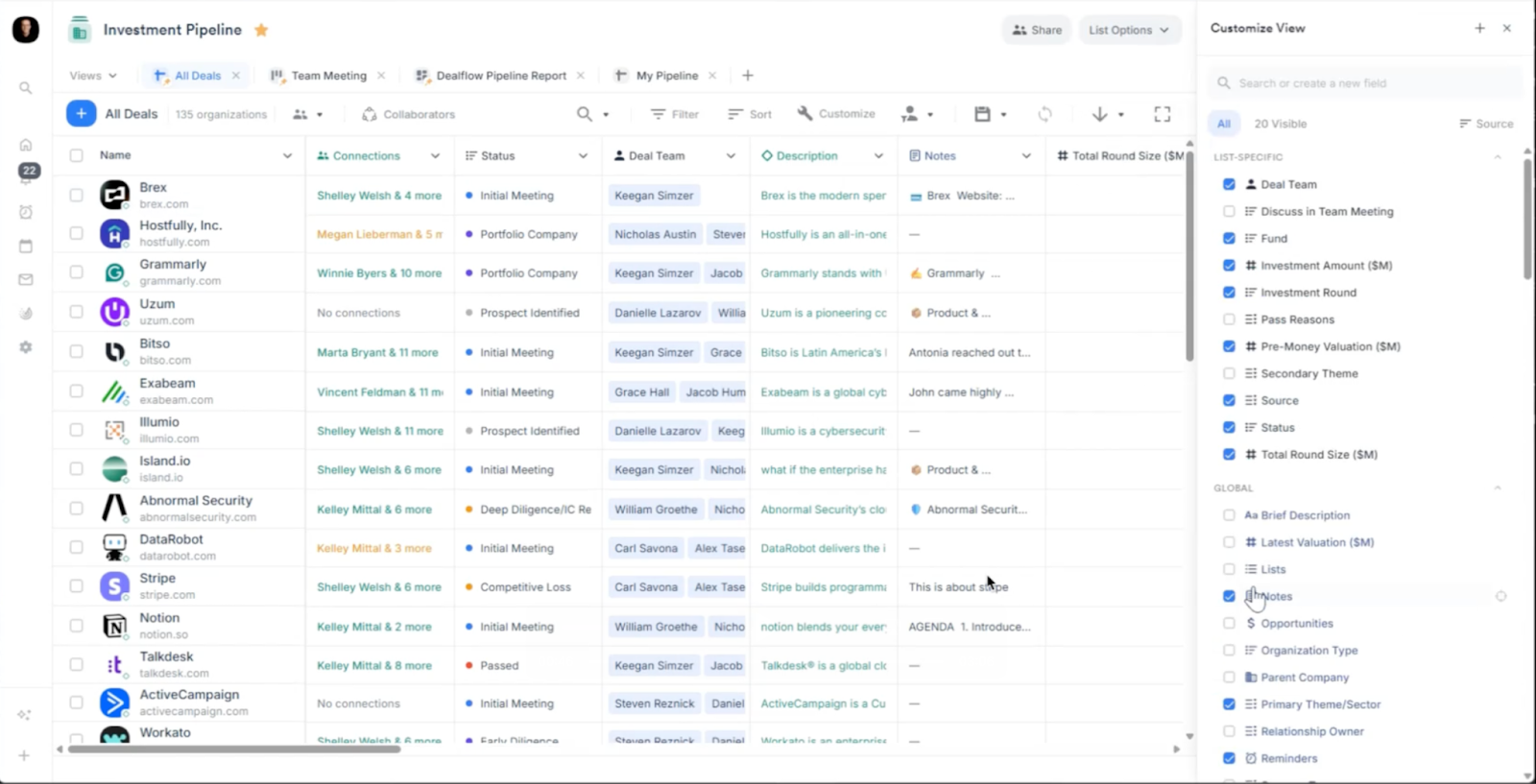
Your pipeline starts with a comprehensive and well-organized list. The List View in Affinity is your command center, providing an at-a-glance overview of every deal in motion.
Best Practices:
- Standardize Key Data Points: Ensure every entry includes core information like Company Name, Status, Deal Team, Total Round Size ($M), and Pre-Money Val ($M). This consistency is crucial for filtering and reporting later.
- Customize Your View: No two teams work alike. Use the "Customize View" panel to add or remove columns that matter most to you. Want to see the Source of the deal or the Last Meeting date directly in the list? You can add it in seconds. This personalizes the pipeline to your team's specific needs, reducing visual clutter and surfacing critical information.
2. Automate Data Capture with Status-Driven Workflows
One of the most powerful features in Affinity is the ability to build logic into your pipeline stages. Manually prompting team members for information is inefficient and prone to error. Instead, let the platform do the work.
Best Practice:
- Set Required Fields for Status Changes: In the video, when the status for "Brex" is changed from "Prospect Identified" to "Initial Meeting," a pop-up automatically appears, requiring the user to input the deal Source. This simple rule ensures that critical data is captured at the precise moment it becomes relevant. You can configure these rules for any status change, guaranteeing data hygiene and enriching your analytics.

3. Visualize Your Progress with the Board View
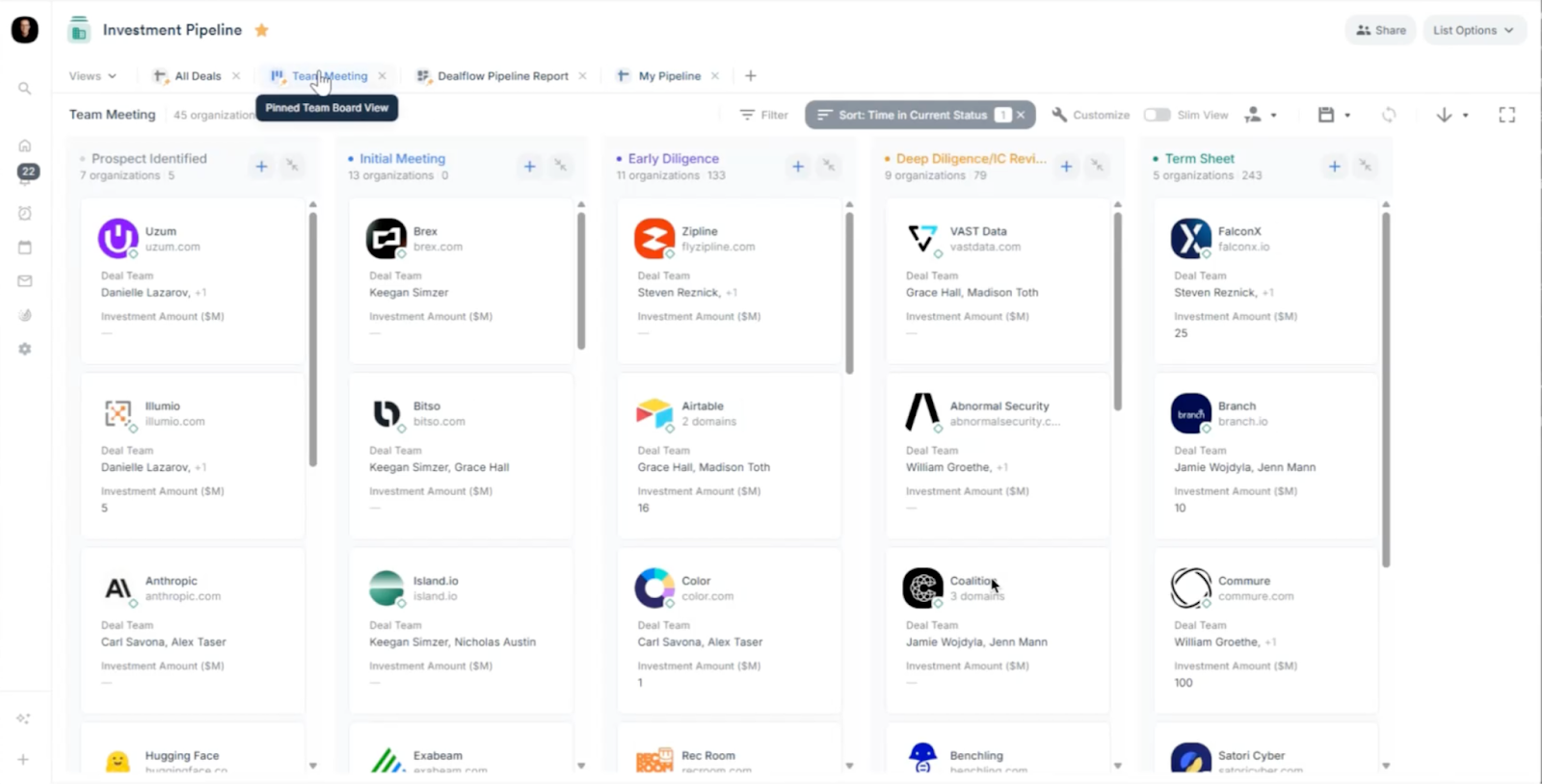
While the List View is excellent for details and sorting, the Board View (Kanban-style) is unparalleled for visualizing your pipeline's flow and managing team meetings.
Best Practice:
- Use the Board View for Pipeline Reviews: The view switches to a board where each deal is a card organized by status (Initial Meeting, Early Diligence, etc.). This format makes it incredibly easy to:
- Visually identify bottlenecks.
- Discuss progress on specific deals.
- Drag and drop cards to update their status in real-time during a meeting.
4. Create a Single Source of Truth for Every Opportunity
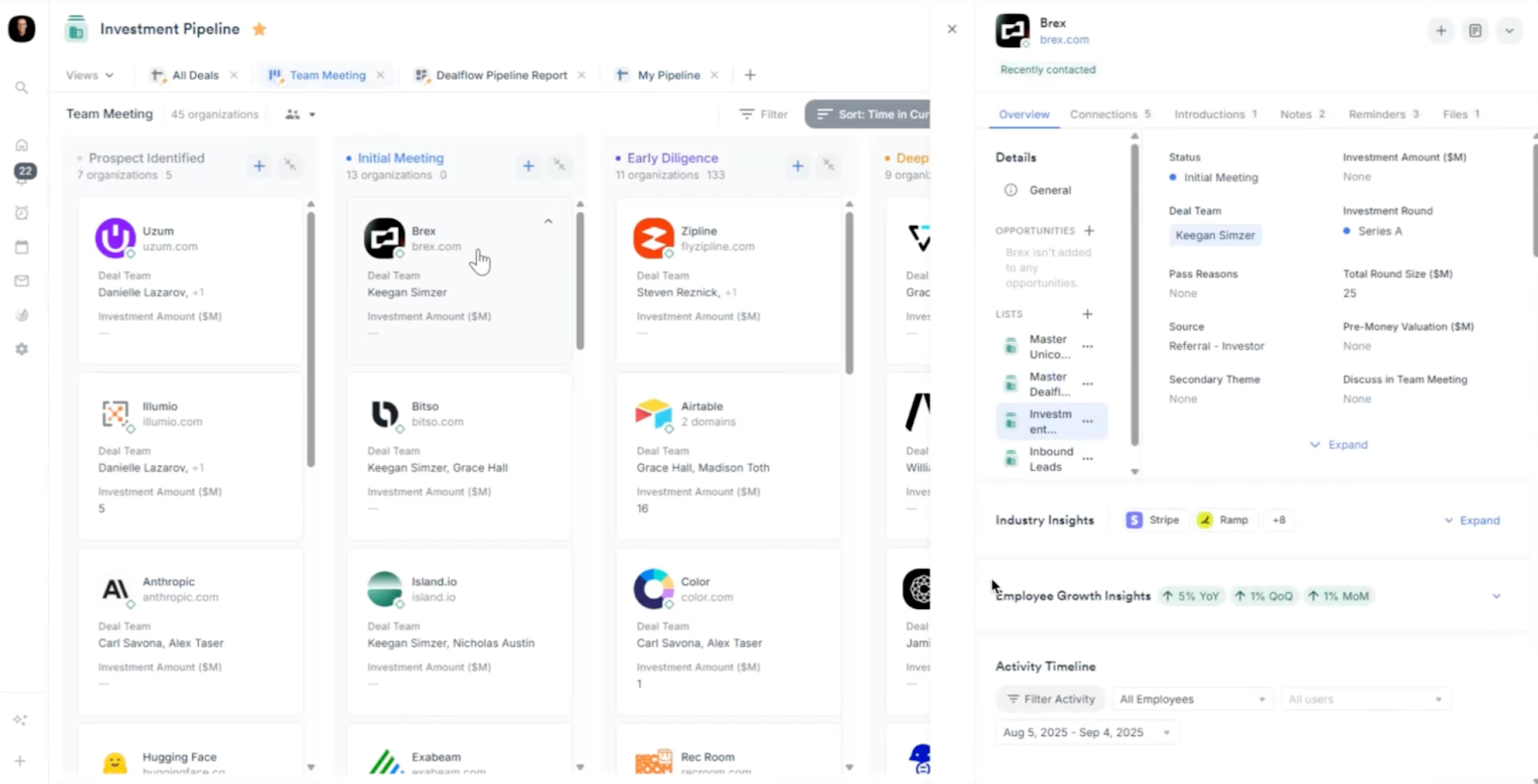
Once you click into a specific deal, Affinity’s detailed side panel opens up, consolidating every piece of information into one accessible place. This eliminates the need to hunt through emails, documents, and calendars.
Best Practices:
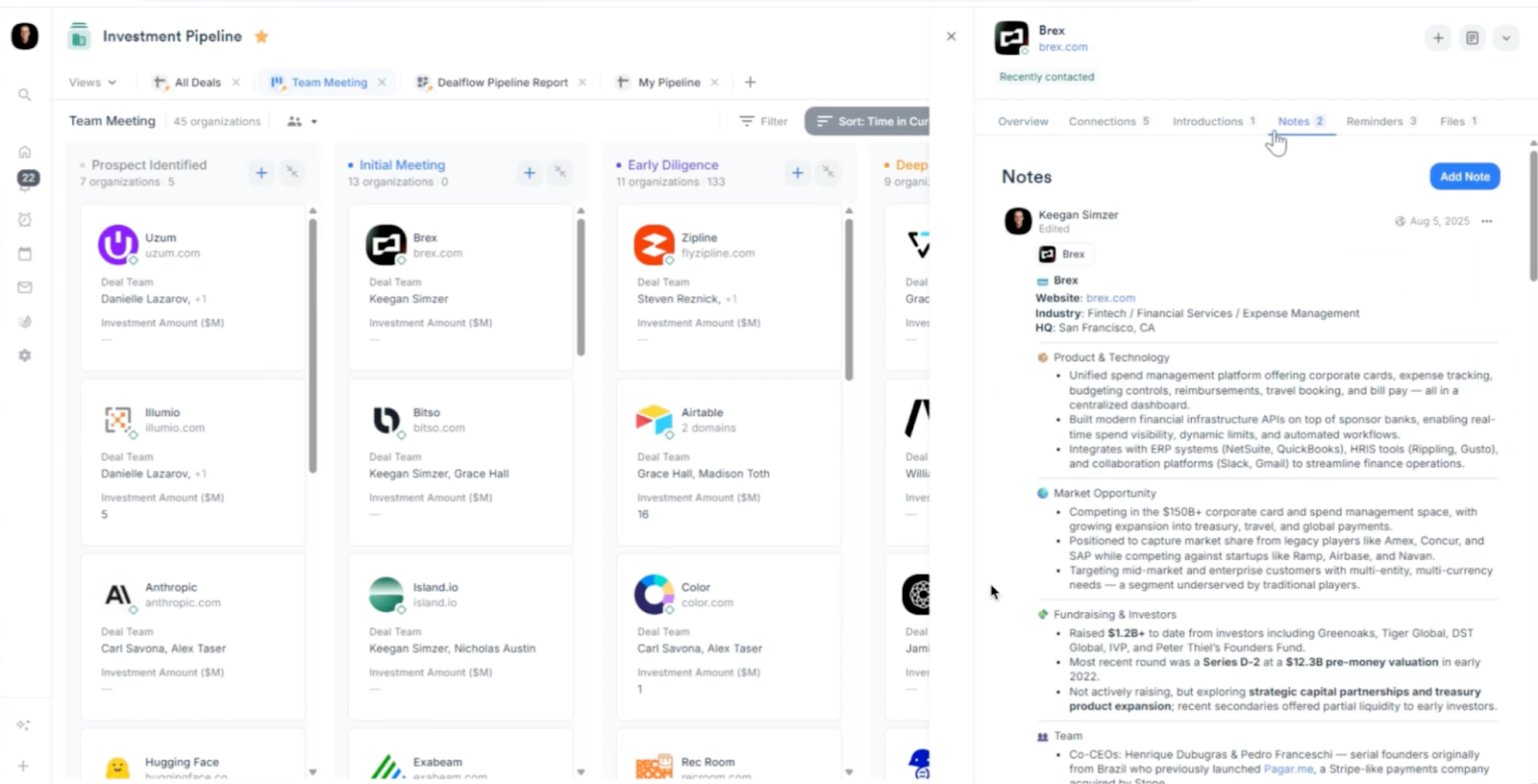
- Log Everything in 'Notes': The Notes tab is your central repository for all qualitative data. This includes everything from initial company briefs and market analysis to detailed meeting agendas and follow-up action items.
- Leverage Reminders for Proactive Follow-up: Never miss the next step. The Reminders tab allows you to set specific, date-based tasks and assign them to team members. This ensures accountability and keeps deals moving forward.
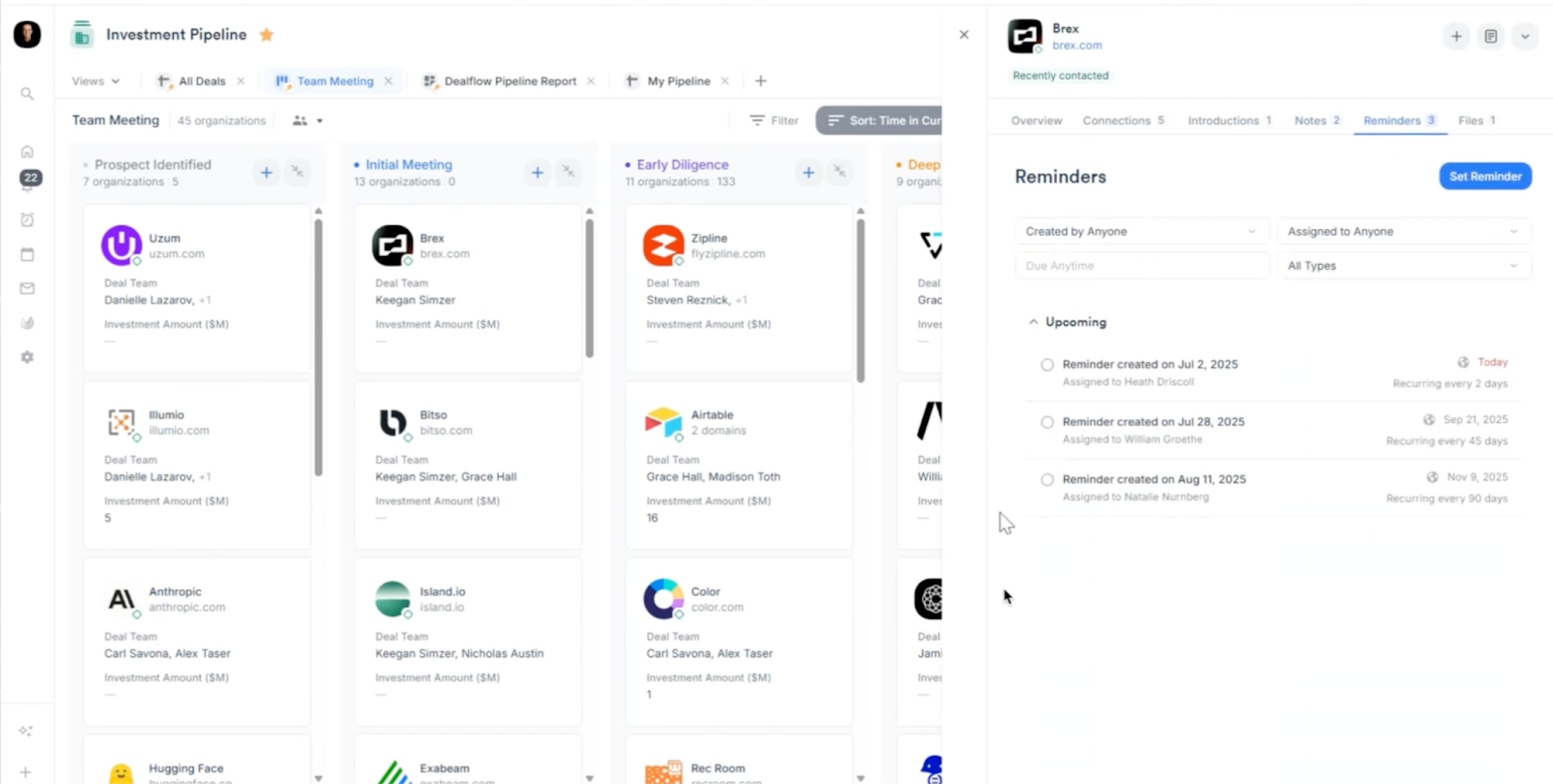
- Track Engagement with 'Activity Timeline': The Activity Timeline provides a chronological view of every interaction—every meeting, email, and call—logged with the company, giving you a complete relationship history.
5. Turn Your Data into Actionable Insights with Reporting
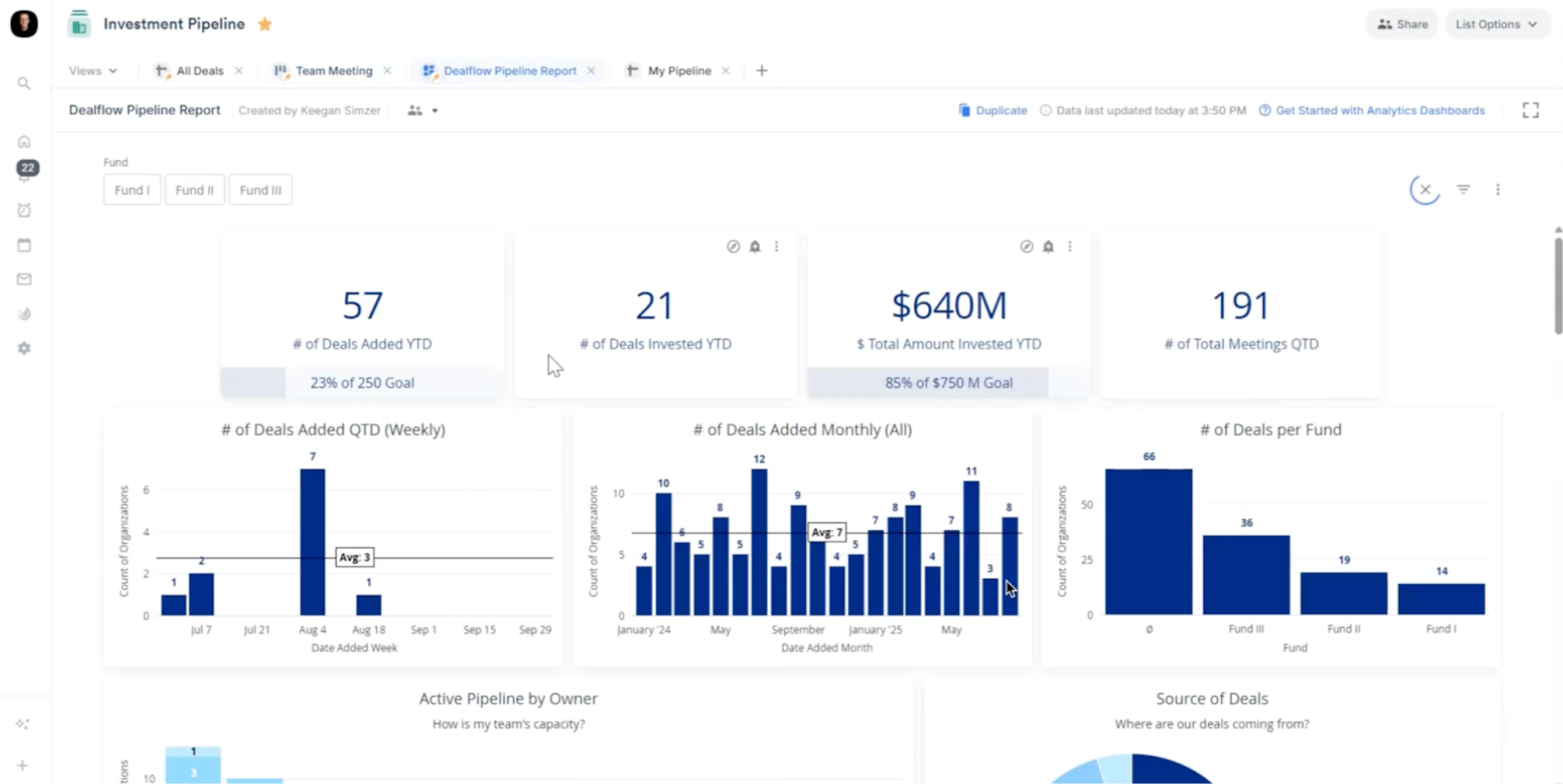
This is where all your diligent data entry pays off. Affinity’s reporting and analytics dashboards transform your pipeline data into a strategic asset, allowing you to answer critical questions about your firm's performance.
Best Practices:
- Monitor Key Performance Indicators (KPIs): The dashboard provides an instant overview of essential metrics like # of Deals Added YTD, Total Amount Invested, and Source of Deals.
- Analyze Your Sourcing Channels: The "Source of Deals" pie chart clearly shows which channels (Referral, Inbound, Outbound, etc.) are yielding the most opportunities. This helps you focus your sourcing efforts where they are most effective.
- Understand Your Funnel Conversion: The "Funnel Reporting" view visualizes how many deals progress from one stage to the next. The "Pass Breakdown" chart next to it reveals why you pass on deals, providing invaluable feedback to refine your investment thesis.
By adopting these practices, your team can leverage Affinity to not only manage your investment pipeline but to truly understand and optimize it. The result is a more efficient process, better-informed decisions, and a significant competitive advantage.
Deal management best practices
In venture capital and private equity, every moment counts. Hours are spent meticulously sifting through prospects, tracking deal statuses, and maneuvering each opportunity through the investment process. All while trying to keep a competitive edge alongside fellow firms with a similar thesis. Affinity understands the intricate dance of deal management in private capital markets, offering a solution tailored specifically for dealmakers in this space.
Affinity’s relationship intelligence platform is not just another CRM; it's a game-changer. With the automatic tracking and organizing of every interaction across your firm, easy-to-share deal insights, native start-up and founder data, and a CRM extension embedded within your email and browser—the complexities of deal management are instantly simplified.
From evaluating and negotiating to closing investment deals, Affinity’s unified deal flow management workflow offers unparalleled visibility and a clear path to action on every deal in the pipeline. Whether engaging with potential investments, conducting due diligence, or preparing for Monday morning meetings—Affinity equips dealmakers with the tools to excel at every stage of the dealmaking journey.
To help you get the most from the Affinity platform, we are here to share some common use cases and best practices aligned to your deal management workflow.
1. Engage with potential investments in a knowledgeable and unique way
Affinity’s automated activity capture ensures every interaction is captured, including AI-generated notes from every call.
Challenges
- Timing a company’s growth trajectory and funding: If a company is not raising funds on first outreach, or they are slightly too immature for your firm, it can be difficult to “catch” them again at the right moment. This can be due to a poor relationship management system, or the lack of a good notification system to know when the company has reached your “sweet spot”.
- Getting warm introductions: It is often difficult and tedious to find who can effectively give a warm introduction to a founder.
- Finding founder contact information: Without warm introductions, investors default to sending cold outreach. Not all founders readily respond to Linkedin and, as with any outbound process, it can be hard to find the right email to connect with a founder.
- Brand trust: Without the prestige of being with a top-tier firm, it takes time and energy to build trust and rapport with founders.
Best practice checklist
- [ ] Warm introductions: Identify warm paths of introduction to founders through your entire firm’s collective network of relationships.Highlight network: Emphasize how your firm's network of relevant contacts, advisors, industry experts, and other portfolio companies can support the startup’s growth.Strategic follow up: If the startup expresses interest or you don't receive an immediate response, follow up in a timely and respectful manner. Persistence without being pushy is key.Personalized outreach: Tailor communication to each startup individually. Reference specific details about their company, achievements, or challenges to demonstrate that you've done your homework.Actionable insights: Provide insights or recommendations related to the startup's industry, business model, or growth strategy to demonstrate your firm's knowledge and commitment.Multiple channel engagement: Utilize a mix of email, social media, mobile, text, and phone calls to make your outreach more comprehensive and memorable.Early engagement: Where possible, engage with startups at an early stage, even before they officially seek funding to show your genuine interest in their success and establish a relationship of trust.Shared values: Emphasize how your firm’s values and mission align with those of the startup.Relevance: Highlight how your expertise, resources, and network align with the startup's needs and goals. Clearly articulate how your firm can add unique value beyond just funding
2. Capture data consistently during the investing process
Notes inside Affinity are cataloged and easily available to support engagement with startups, weekly updates, investment committee presentations, and due diligence.
Challenges
- Fragmented data: Investors may use multiple sources to gather key insights about a company, a tedious and time-consuming process that makes it hard to aggregate information into a format that is shareable and presentable.
- Disorganized company data: Data from companies, especially early stage companies, can be disorganized and incomplete. It is inefficient to go through documentation, and chase down additional information needed.
Best practice checklist
- [x] Network mapping tools Use network mapping tools to visualize connections between companies, founders, and investors to identify potential investment opportunitiesAutomated data collection: Spot emerging opportunities by ****setting up automated tools to monitor industry news, startup databases, patent filings, and regulatory changes relevant to your investment focus.Strategic partnerships: Establish partnerships that (e.g. industry associations, accelerators, incubators, and other ecosystem players) provide insights and referrals aligned with your investment thesis.Investor syndicates: Collaborate with other firms or angel investors through syndicates to pool resources and share insights on potential investment opportunities.Alumni networks: Speak with experts in your existing portfolio companies to understand proprietary information. They can provide insights into emerging trends and potential investment opportunities.Advisors and mentors Cultivate relationships with advisors, mentors, and domain experts who have deep industry knowledge and can provide insider perspectives on emerging startups and trends.Incubators and accelerators: Collaborate with incubators and accelerators to gain access to their pipelines and demo days, where startups showcase their progress.
3. Run an effective due diligence process
Affinity’s network and relationship intelligence provides instant access to customer, partner, and third party experts to support due diligence.
Challenges
- Speed to insight: When investors pull information from multiple sources and data from companies is incomplete, it can be challenging to sort, clean, and meaningfully analyze the data in a short period of time.
- Limited time for diligence: Due diligence for live deals often happens in an extreme time crunch, especially when a deal is competitive. It is difficult to complete all of the tasks needed (information gathering, expert calls, reference calls) in what can be a 2-3 week window.
Best practice checklist
- [ ] Pre-diligence screening: Conduct a preliminary screening to fFilter out opportunities that clearly don't align with your investment thesis or have significant red flags. This saves time and resources for more in-depth evaluation.Customer and partner references Contact the startup's customers, partners, and collaborators to gain insights into their reputation, product quality, and business relationships.Clear evaluation framework Develop a framework that outlines the key criteria for assessing potential investments to ensure a structured approach and consistency in evaluation.Risk assessment: Use data and information gathered in calls to ****assess the risks associated with the investment and determine whether the potential returns justify those risks.Focused interviews: Interview startup founders and team members for the purpose of extracting key insights related to the startup's strategy, market positioning, and execution plans.Automated feedback loop: Maintain an ongoing feedback loop with the startup during due diligence to address concerns and questions promptly, and foster transparent communication.Integrations: Use due diligence software and collaboration tools to streamline the process, manage documents, and facilitate clear communication across the team.Deal breakers Clearly define deal-breakers based on your investment criteria. If any of these deal-breakers are identified during due diligence, it can be a signal to exit the process.Executive summary: Provide a brief summary of the opportunity, highlighting key information such as market potential, unique value proposition, and team background.
4. Provide deal pipeline visibility and drive meaningful action in Monday morning meetings
Affinity’s Kanban and list views for deal flow provide instant visibility into deal status in Monday morning meetings.
Challenges
- Inefficient pipeline reviews: Partners have little time, and often many deal pipelines to review. Doing this thoroughly each week is tedious and challenging, and it can become the bottleneck to a faster deal process.
- Longer deal management cycles: Without a clear view of all deals in one place, what stage they’re in, and clear actionable insights on what needs to be done to drive them forward, it can be difficult to collaborate well as a team to close deals
Best practice checklist
- [ ] Monday morning meeting: Hold a weekly meeting where all stakeholders review the firm’s pipeline where the entire team discusses the status of each deal, addresses challenges, and identifies opportunities to move deals forward.Transparent documentation: Document all interactions, meetings, and communications related to each deal to ensure that all team members have access to the latest information.Centralized deal management system: Position your CRM platform as the place where all deal-related information is stored, tracked, and updated.Customized deal stages: Define clear and customized deal stages that reflect your firm's specific workflow and key milestones from initial contact to final investment decision.Regular deal updates: Require deal owners to provide regular updates on deal progress in the form of written summaries, presentations, or status reports.Deal champions: Designate specific team members as champions for each deal. They are responsible for driving deal progress, coordinating actions, and ensuring accountability.Automated notifications: Set up notifications to alert team members when deals move to new stages or when specific actions are required.Data analytics and reporting: Monitor pipeline performance, conversion rates, and other key metrics to inform strategic decisions.Training and onboarding: Ensure that all team members can use deal management tools and understand their role in maintaining accurate data.Collaborative tools: Utilize collaborative tools and project management software to facilitate communication, task assignment, and track progress.Leadership visibility: Ensure that senior leadership is regularly updated on pipeline progress. Their involvement can drive accountability and provide support when needed.
5. Close deals and deploy funds efficiently
Easily track company insights and interactions, and collaborate to efficiently allocate resources across new portfolio companies inside Affinity.
Challenges
- Brand awareness: Unless you’re an investor at a top tier firm (think a16z), brand awareness can be low. When founders come to decide who to partner with, less known investors can be forgotten or deprioritized.
- Time committed to portfolio companies: Partners who look after multiple portfolio companies are stretched thin. It’s a full time job just to manage a portfolio, but they are still responsible for managing junior team members, overseeing pipeline, reviewing deals, and fundraising.
Best practice checklist
- [ ] Early alignment: Initiate discussions with startups early to align on key terms and expectations before formalizing the term sheet.Feedback loop: Maintain open channels of feedback between your investment team and legal counsel. This helps ensure that legal terms align with your investment goals.Investment committee review: Present the negotiated terms to your investment committee for review and approval before finalizing the deal.Standardized processes: Develop standardized processes and workflows for deal closing and cash deployment to reduce the risk of errors and delays.Clear and consistent communication: Communicate effectively with all parties involved, including legal counsel, portfolio companies, and internal teams.Cross-functional collaboration: Foster collaboration among different internal teams, including legal, finance, investment, and operations, to ensure alignment and efficiency.Investment committee updates: Maintain transparency and accountability by keeping the investment committee informed about the progress of deal closing and cash deployment.Investment operations automation: Utilize investment operations platforms to automate routine tasks, reporting, and data management.Early alignment: Initiate discussions with startups early to align on key terms and expectations before formalizing the term sheet.Feedback loop: Maintain open channels of feedback between your investment team and legal counsel. This helps ensure that legal terms align with your investment goals.Investment committee review: Present the negotiated terms to your investment committee for review and approval before finalizing the deal.Standardized processes: Develop standardized processes and workflows for deal closing and cash deployment to reduce the risk of errors and delays.Clear and consistent communication: Communicate effectively with all parties involved, including legal counsel, portfolio companies, and internal teams.Cross-functional collaboration: Foster collaboration among different internal teams, including legal, finance, investment, and operations, to ensure alignment and efficiency.Investment committee updates: Maintain transparency and accountability by keeping the investment committee informed about the progress of deal closing and cash deployment.Investment operations automation: Utilize investment operations platforms to automate routine tasks, reporting, and data management.
Deal management: Affinity tips & tricks
From filtering down to the most promising investments to preparing for the Monday morning meeting—Affinity helps you stay focused on the deals most likely to close. Here are four ways to maximize how you use the platform.From filtering down to the most promising investments to preparing for the Monday morning meeting—Affinity helps you stay focused on the deals most likely to close. Here are four ways to maximize how you use the platform.
Create lists and triggers that track your pipeline
Use the Organization List template named “Deal List”. It will automatically enrich with deal-relevant data from vendors like Crunchbase and Pitchbook—eliminating the need for manual CRM data entry to get the full picture.Use the Organization List template named “Deal List”. It will automatically enrich with deal-relevant data from vendors like Crunchbase and Pitchbook—eliminating the need for manual CRM data entry to get the full picture.
Customize the list columns to further mirror your firm’s deal flow management preferences. Ensure details that are consistently important to the pipeline are accounted for like: “Status”, “Owner, “Deal Size”, “Stage”, and “Priority”.Customize the list columns to further mirror your firm’s deal flow management preferences. Ensure details that are consistently important to the pipeline are accounted for like: “Status”, “Owner, “Deal Size”, “Stage”, and “Priority”.
PRO TIP: Add a customized formula field column for ‘Deal Score’ to help you prioritize engagement based on your key criteria.PRO TIP: Add a customized formula field column for ‘Deal Score’ to help you prioritize engagement based on your key criteria.
Build status triggers to ensure you and your team keep key deal information up-to-date and consistently use the freshest insights when prepping for Monday morning meetings.Build status triggers to ensure you and your team keep key deal information up-to-date and consistently use the freshest insights when prepping for Monday morning meetings.
Set up and share important pipeline visualizations
Assess the native relationship intelligence, company, and person data on the deal list and ensure to zero in on the key signals most important to your deal making decisions.Assess the native relationship intelligence, company, and person data on the deal list and ensure to zero in on the key signals most important to your deal making decisions.
Filter and sort lists, saving the configurations into Views. Each View has a unique URL that can easily be shared with colleagues. Run a smoother Monday Morning Meeting with a Board View of your pipeline.Filter and sort lists, saving the configurations into Views. Each View has a unique URL that can easily be shared with colleagues. Run a smoother Monday Morning Meeting with a Board View of your pipeline.
PRO TIP: Use collaborator seats to securely share lists of relationships and deal information with portfolio companies, LPs, and other external partners.PRO TIP: Use collaborator seats to securely share lists of relationships and deal information with portfolio companies, LPs, and other external partners.
Seamlessly consolidate and communicate
Keep your pipeline fully enriched as time progresses by ensuring pitch decks and other key files shared over email are automatically pulled into Affinity. If you already use a popular storage system, you can still automate CRM file consolidation with our many native integrations.Keep your pipeline fully enriched as time progresses by ensuring pitch decks and other key files shared over email are automatically pulled into Affinity. If you already use a popular storage system, you can still automate CRM file consolidation with our many native integrations.
Ensure team collaboration remains tight across your everyday tools by setting up native integrations between Affinity and your text and email apps to automatically tag colleagues for a follow-up or to alert them about a recent conversation.Ensure team collaboration remains tight across your everyday tools by setting up native integrations between Affinity and your text and email apps to automatically tag colleagues for a follow-up or to alert them about a recent conversation.
As deals progress through the funnel, use Affinity Notetaker as a virtual meeting companion that captures key takeaways, generates transcripts, and syncs everything with the corresponding people and company profiles in Affinity.As deals progress through the funnel, use Affinity Notetaker as a virtual meeting companion that captures key takeaways, generates transcripts, and syncs everything with the corresponding people and company profiles in Affinity.
Storing manually written notes in Affinity also ensures that deal-relevant data stays in one place for teams as they conduct due diligence, prep investor committee presentations, set up for a weekly update meeting, or work on supporting an existing portfolio company.Storing manually written notes in Affinity also ensures that deal-relevant data stays in one place for teams as they conduct due diligence, prep investor committee presentations, set up for a weekly update meeting, or work on supporting an existing portfolio company.
Take relationship intelligence and your CRM with you as you research and engage startups and founders from your email inbox and web browser—by downloading Pathfinder or our Outlook add-in to:Take relationship intelligence and your CRM with you as you research and engage startups and founders from your email inbox and web browser—by downloading Pathfinder or our Outlook add-in to:
- Qualify potential deals using Affinity’s data as you visit websites and LinkedIn pagesQualify potential deals using Affinity’s data as you visit websites and LinkedIn pages
- Identify existing relationships between your team and a company and the strength of that relationship for a warm introductionIdentify existing relationships between your team and a company and the strength of that relationship for a warm introduction
- Act on qualification decisions by creating opportunities, assigning lists, and updating deal statusesAct on qualification decisions by creating opportunities, assigning lists, and updating deal statuses
- Capture new information about deals from your inbox with field updates, notes, and file uploadsCapture new information about deals from your inbox with field updates, notes, and file uploads
- Catch up on deals with a timeline of activity and notes alongside your email and meeting invitesCatch up on deals with a timeline of activity and notes alongside your email and meeting invites
PRO TIP: Build your network, drive deals forward, and collaborate with others while you’re on the go with Affinity’s mobile app. Get a full view of your pipeline and make updates to it without opening up your laptop.PRO TIP: Build your network, drive deals forward, and collaborate with others while you’re on the go with Affinity’s mobile app. Get a full view of your pipeline and make updates to it without opening up your laptop.
Never drop the ball on another deal
Set up reminders to nurture leads and stay on top of your most important relationships and triggers to ensure each deal moves efficiently through your pipelineSet up reminders to nurture leads and stay on top of your most important relationships and triggers to ensure each deal moves efficiently through your pipeline
Track pipeline progress over time with Affinity Analytics to:Track pipeline progress over time with Affinity Analytics to:
- Monitor win rates by individual, team, region, industry, or other metricsMonitor win rates by individual, team, region, industry, or other metrics
- Gain a better understanding of team activity and performance across metrics like: ratio or emails to meetings, deal stage timelines, stage of lost deals, and inbound vs. outboundGain a better understanding of team activity and performance across metrics like: ratio or emails to meetings, deal stage timelines, stage of lost deals, and inbound vs. outbound
- Keep performance momentum on track with automated dashboard alerts that are triggered when team activity, deal flow, or company/people metrics hits a custom set parameterKeep performance momentum on track with automated dashboard alerts that are triggered when team activity, deal flow, or company/people metrics hits a custom set parameter
- Monitor deal source and outreach effort success across your firm and invest accordingly in the best producersMonitor deal source and outreach effort success across your firm and invest accordingly in the best producers
PRO TIP: Connect networks with close allies to unlock paths to your next big opportunity. Use Affinity Alliances to share each other's networks to help uncover new relationships and the warm introduction you need to your next deal, subject matter expert, or investor.PRO TIP: Connect networks with close allies to unlock paths to your next big opportunity. Use Affinity Alliances to share each other's networks to help uncover new relationships and the warm introduction you need to your next deal, subject matter expert, or investor.
Conclusion
Private capital success hinges on effective deal management and relationship nurturing. Yet, maintaining a vast network of contacts and opportunities can quickly become overwhelming.Private capital success hinges on effective deal management and relationship nurturing. Yet, maintaining a vast network of contacts and opportunities can quickly become overwhelming.
Affinity’s relationship intelligence platform makes deal management easier by helping teams organize important data, keep detailed records automatically, and provide the insights necessary to make data-driven decisions. Say goodbye to scattered spreadsheets and fragmented communication and start streamlining the deal management process to ensure target investments close efficiently.
Getting started with Affinity lists
At Affinity, the core feature that drives private capital dealmaking workflows—from deal sourcing to portfolio support and fundraising—is the Affinity list. Affinity lists are flexible enough to meet each team’s workflows while providing a standardized, intuitive look and feel.
In this guide, we’ll cover key list features and how to use them across five crucial workflows:
Deal sourcing: Track and evaluate potential investments (List 1)
Deal management: Move opportunities through your pipeline (List 2)
Portfolio support: Manage founder requests and industry connections (Lists 3-5)
Investor relations: Monitor limited partner (LP) relationships (Lists 6-7)
Fundraising: Track your prospective and committed investors for your next fund (List 8)
Whether you’re new to Affinity or you’re a seasoned power user, these eight essential lists will help you stay on top of your deal pipeline, strengthen investor relationships, and demonstrate your firm’s value to founders and LPs alike.
These are not exhaustive ways to use Affinity lists but are key examples of how they can streamline your workflows.
Affinity lists are designed to help you systematically track and manage your relationships and deals. There are three different types of lists, all of which have pre-set columns that can be customized depending on your specific needs:
- Organization lists: Used to manage deal flow and portfolio companies. Only organizations can be added to this type of list.
- Opportunity lists: Used to track LPs and for fundraising. Both organizations and individuals can be added to this type of list.
- People lists: Used to manage event attendees and talent pipelines. Only individuals can be added to this type of list.
Lists tips and tricks
To create a list, log in to Affinity and navigate to the default lists at the bottom of the homepage.
To add a new column, scroll to the far right of your list and click on “‘+ New Column.” You can choose from various column types, including text, number, date, and location.
Regardless of the list type, every Affinity list has different colored columns:
- Blue columns ****are global columns, meaning they will follow an organization, opportunity, or person to any list they appear on.
- Black columns are list-specific, meaning they’re only viewable and relevant to the specific list you’re in.
- Green columns are enriched with third-party data (e.g., Crunchbase, Dealroom, PitchBook) and Affinity Data.
To save a specific view, click on the “+” icon at the very top right of the list view. Alternately, apply the desired filters to your list, then click on the save icon at the top right corner of your list. Select “Duplicate this view.”
To visualize a list in a board view, click on “Views” at the top left of your list. Then, select the board or dashboard view at the bottom. In a board view, you can drag and drop cards between categories, customize their details, and apply filters for better organization.
Deal sourcing list
To stay competitive, dealmakers need a steady stream of opportunities that align with their fund’s thesis and show growth potential. But identifying the right deals isn’t easy; our research shows that 49% of firms rely on 4-6 data sources to evaluate a single deal.
As the volume of data about each opportunity increases, so does the complexity of finding, tracking, and evaluating potential deals. Affinity simplifies the deal sourcing process by combining relevant deal data with relationship insights. Using Affinity’s automated data capture and AI-driven relationship intelligence, you can identify new founders and companies, and stay alert to opportunities in your existing network.
This section covers how to use an organization list to uncover new opportunities and monitor prospective deals.
1. Tracking potential deals
Purpose: Track prospective companies that align with your investment criteria.
Use an organization list for a comprehensive view of potential investments, including companies you’ve previously screened or met with and new companies that fit your current investment thesis.
Questions this list answers:
- How well does this company fit our current investment thesis?
- Have we previously met with them, and how far into the process did they make it?
- What is their funding history?
- How is the company performing in terms of employee growth and leadership hiring?
How this list is structured
Organization lists can help you monitor potential deals, prioritize follow-ups, and decide when to re-engage based on a company's key growth indicators.
Relationship management columns: Track company details and the relationship owner.
Name: Captures the company’s name.
Owners: Displays the internal team members responsible for a potential deal.Source of introduction: Shows the person or channel that referred the company. (e.g., LP, Co-investor, Industry Expert, Accelerator, Event, Outbound)Connections: Shows your team’s existing relationships with a company.Last meeting: Logs the date you most recently reached out (via email, meeting, or call) to the company.Pro tip:Set up a reminder to reach out if you haven’t interacted in a specified period of time.Last email: Indicates the date of the most recent email you or your team sent to the company.
Firmographic columns: Capture information about a company’s history, investors, and growth potential.
Thematic fit columns: These are examples of new columns you can manually add to your list to gauge whether a company is a good fit for your strategy.*
- These are examples of new columns you can manually add to your list or customize according to your firm’s processes.
- ** These fields are not automatically populated by Affinity, but are fields your team must input manually.*
Deal management list
Sorting through prospects, tracking deal statuses, and moving opportunities through the pipeline is often time-consuming and manual. Affinity provides unparalleled visibility into every deal in your pipeline—with enriched company and relationship data, automatic interaction tracking, and easy-to-share deal insights that accelerate deal management workflows.
This section covers how you can use organization lists to streamline deal management and ensure no opportunity slips through the cracks—whether you’re engaging with potential investments, conducting due diligence, or preparing for Monday morning meetings.
2. Tracking and managing your deal pipeline
Purpose: Manage your deals, monitor their progress over time, and ensure efficient follow-through.
Use an organization list for a comprehensive view of every company in your pipeline. This type of list includes Affinity’s enriched relationship data, company data, and any internal notes—like priority rankings and links to investment memos—to streamline tracking.
Questions this list answers:
- How long has a deal been in its current status (e.g., first meeting or due diligence)?
- What is a specific company’s funding history?
- Where can I read this company’s investment memo?
- How much capital is this company looking for?
How this list is structured
Organization lists include columns for tracking deal progress, interactions, and team assessments—helping your team quickly evaluate where each deal stands and identify next steps.
Relationship management columns: Track ownership and engagement with potential deals.
Name: Shows the company’s name.
Owners: Displays the internal team members responsible for a deal.
People: Shows your team’s existing relationships with a company.
Date added: Indicates when a company was added to your list, helping you monitor deal flow.
Investment team owner:** Provides a space to record who on your investment team is responsible for a deal.
Last email, Last Meeting: Logs the most recent interactions with a company, providing visibility into engagement.
Sourcer: Identifies who introduced the deal to your firm.
Deal metrics columns: View financial and progress-related insights.
Internal notes columns: These are examples of new columns you can manually add to your list to record firm-specific and qualitative insights.*
- These are examples of new fields you can add to your list or customize according to your firm’s processes.
- ** These fields are not automatically populated by Affinity, but are fields your team must input manually.*
Portfolio support lists
Portfolio support is often thought of as a way to manage relationships with the founders and executive teams of the companies you’ve invested in. In reality, serving your portfolio companies involves managing a vast network of talent, industry experts, investors, vendors, and even your LPs.
With the following lists, you’ll be able to efficiently respond to founder requests (like making introductions on their behalf to external partners), drive portfolio growth, and share timely updates with investors.
This section walks through opportunity, people, and organization lists you can use to manage the network of resources and connections you have to support your portfolio companies.
3. Tracking team introductions for your portfolio companies
Purpose: Track and manage introductions your team facilitates between founders and key contacts in your network.
Use an opportunity list to ensure that your team’s portfolio support efforts are organized, measurable, and effective. Whether facilitating a strategic hire, a customer introduction, or a funding connection, this list provides a structured way to manage and optimize your portfolio support.
Questions this list answers:
- What types of portfolio support requests are currently in the pipeline?
- Are we focusing more on recruitment, customer referrals, or investing?
- How often are we making introductions, and are we over-reliant on specific individuals or firms?
- How is the portfolio support workload distributed among our team? Is anyone overburdened?
- Are any portfolio companies not receiving enough levels of support?
How this list is structured
Organization lists can be used to track introductions, engagement frequency, and outcomes to help your team measure their impact and optimize resource allocation.
Relationship management columns: Track key contacts and relationship owners.
Name:** Shows the portfolio company and person or company introduced (suggested format: [Portfolio company name] - [Person/Company introduced]).
Organizations: Tags the external companies involved in the introduction.
Portfolio companies:** Provides a space to identify which portfolio company the introduction supports.
People: Tracks the external individuals connected through the introduction.
Owners: Assigns internal team members responsible for managing the introduction.
Support status columns: Monitor the type and progress of your support.
Outcome tracking columns: These are examples of new columns you can manually add to your list to measure your impact.*
- These are examples of new fields you can add to your list or customize according to your firm’s processes.
- ** These fields are not automatically populated by Affinity, but are fields your team must input manually.*
4. Managing your network of industry experts and talent
Purpose: Track and organize industry experts and talent in your network to match the right expertise to your portfolio companies.
Use a people list to track executive talent, industry advisors, and investors in your network who can provide valuable support to your portfolio companies. You can create multiple versions of this list for specific segments of your network, such as:
- Executive talent for recruitment support
- Industry advisors to address domain-specific requests
- Investors for when your portfolio companies are raising their next round
Questions this list answers:
- When did we last connect with this expert? How many times have we connected with them over the past X months?
- What types of support are they interested in offering?
- Which portfolio companies have they engaged with?
- Which portfolio companies would benefit from their expertise?
How this list is structured
People lists can be used to track key details about industry experts and talent in your firm’s network and engagement frequency, helping you identify high-value connections for your portfolio companies.
Relationship management columns: Track essential information about each contact and the type of support they’re able to provide.
Name: Records the name of the industry expert, talent, or investor.
Type of interactions:** Provides a space to list the interactions you’ve had with your contacts (suggested categories: Co-investing, Talent, Sales, Networking, Events, Diligence).
Industry: Captures the most relevant industries associated with this contact (this is automatically populated using Affinity’s enriched data, but can be manually adjusted).
Network interests:** Provides a space to log the type of support a contact is interested in providing (suggested categories: Advisory, Board seats, Diligence, Technical support, Networking, Speaking opportunities).
Engagement tracking columns: Monitor the status of your engagement with industry experts and talent.
- These are examples of new fields you can add to your list or customize according to your firm’s processes.
- ** These fields are not automatically populated by Affinity, but are fields your team must input manually.*
5. Managing your network by industry
Purpose: Manage relationships within specific industries to connect portfolio companies with the right people more efficiently.
Use an organization list to track your firm’s network within a specific industry, making it easier to connect portfolio companies with potential customers, partners, and other relevant stakeholders. After investing in multiple companies within the same space, you’ll often find opportunities to introduce portfolio companies to similar industry players.
By using this list, you can track these interactions, monitor ongoing opportunities, and ensure your portfolio companies are engaging with the right contacts at the optimal stage of their business and product development to maximize growth.
Questions this list answers:
- Which portfolio companies are currently working with or selling to key players within the industry?
- Which portfolio companies are looking to engage with specific industry players?
- Who in our firm has connections to key companies in this industry?
- Which individuals in these key companies do we have relationships with?
- What is the status of our outreach and relationship-building efforts with these companies?
How this list is structured
Organization lists track details about companies in the industry, their relationships with portfolio companies, and the status of your outreach efforts.
Relationship management columns: Track key details about companies and individuals within certain industries.
Name: Logs the name of the industry expert, talent, or investor.
Connections: Assigns the internal team members who have relationships with the contact.
Contact relevance:** Provides a space to identify the most relevant contacts at the company.
Engagement tracking columns: These are examples of new columns you can manually add to your list to monitor the status and progress of outreach and relationship-building efforts.*
- These are examples of new fields you can add to your list or customize according to your firm’s processes.
- ** These fields are not automatically populated by Affinity, but are fields your team must input manually.*
LP engagement lists
Maintaining strong relationships with your LPs requires more than periodic updates—it depends on actively tracking their engagement with your firm. Understanding how LPs interact with your events, communications, and other key touchpoints will help you refine your outreach strategy, strengthen relationships, and anticipate future commitments.
In this section, we’ll walk through how you can use organization and people lists to monitor LP interactions in a structured way and ensure that your most important relationships remain active and well-managed—providing a solid foundation for future fundraising efforts.
6. Tracking LP engagement
Purpose: Monitor LP interactions, assess engagement levels, and anticipate future investment potential.
Use an organization list for a detailed view of how LPs are interacting with your firm, allowing you to monitor relationship health, assess the likelihood of future investment, and optimize engagement efforts.
Questions this list answers:
- Which firm-hosted events, meetings, and emails are LPs engaging with?
- How much has each LP invested in the past?
- How likely is it that an LP will re-invest?
- How much are we short or ahead of our target for our next fund?
How this list is structured
Organization lists can track relationship history, engagement frequency, and investment trends to help your team identify high-priority relationships and opportunities for re-engagement.
Relationship management columns: Track ownership and key LP details.
Main contact:** Provides a space to assign the team member responsible for the LP relationship.
Type of investors:** Provides a space to categorize the LP by investor type (e.g., pension fund, family office, foundation, corporate).
Current fund amount:** Provides a space to log the amount the LP has invested in one of your current funds.
Investment probability columns: Assess the likelihood of reinvestment.
Engagement activity columns: These are examples of new columns you can manually add to your list to monitor the most effective engagement methods.*
- These are examples of new fields you can add to your list or customize according to your firm’s processes.
- ** These fields are not automatically populated by Affinity, but are fields your team must input manually.*
*∆ ***Recommended but optional columns
7. Tracking LP contact details
Purpose: Record key biographic and firmographic details about your LPs to facilitate future engagement.
Use a people list to capture practical information on how to contact your LPs since investment decisions often come down to how you engage with specific individuals.
Questions this list answers:
- Where is an LP located if we need to meet in person?
- Which industries do they invest in?
- Which events did each LP attend and which upcoming events are they registered for?
How this list is structured
People lists can be used to capture key LP details, engagement history, and preferences—facilitating more personalized and relevant outreach.
Relationship management columns: Track key LP contact details.
Current organization: Shows which firm the LP is associated with, using Affinity’s enriched data.
LP type:** Provides a space to categorize the LP by type (e.g., pension fund, family office, foundation, corporate).
Location: Notes the LP’s city to coordinate in-person meetings when traveling.
Industry interest area:** Provides a space to note the industries or investment areas the LP is most interested in.
Engagement activity columns: These are examples of new columns you can add to your list to monitor the most effective engagement methods.*
- These are examples of new fields you can add to your list or customize according to your firm’s processes.
- ** These fields are not automatically populated by Affinity, but are fields your team must input manually.*
*∆ ***Recommended but optional columns